Beyond tables & vectors: why your most complex problems need a knowledge graph

May 04, 2026
It happens to every developer eventually. You're staring at a bug report for a software library you maintain, and the panic sets in. The faulty function lives in package-x, but nobody directly installs package-x. It's a dependency of package-y, which is a dependency of package-z, which powers three of your company's core microservices. The question isn't just "What is broken?" but a cascading web of "Who, transitively, is affected by this bug, and what do we need to patch first?"
You could try to answer that with a few SQL queries against your build metadata, or maybe you’d dump everything into a vector database and hope a semantic search surfaces the right connections. But very quickly, you’ll hit a wall. This is precisely the class of problem that knowledge graphs were built to solve - and platforms like Stardog show exactly why they operate in a league of their own.
The shape of the problem
To understand why a knowledge graph is different, we have to look at the underlying models of traditional databases.
Relational Databases (RDBMS) are the backbone of the digital world. They are phenomenal at managing structured, tabular
data. You want the order history for user #4251? An RDBMS with a good index gives it to you in milliseconds. However,
relationships are expensive. Modeling a "depends on" relationship in SQL means a foreign key and a JOIN. Querying
"find all packages that depend on this buggy package, to an arbitrary depth" requires a recursive Common Table
Expression (CTE). A recursive CTE works, but it's a brute force pathfinding exercise on a model designed for rectangles,
not webs. As the depth and variety of relationships grow, the SQL becomes a tangled, slow mess of UNION ALL clauses.
The schema rigid tables with predefined columns is a superpower for consistency but a straitjacket for highly
interconnected, evolving data.
Vector databases, as described in this previous article represent the new wave, designed for the age of AI. They are incredible at finding similarity. You embed a description of a bug, and a vector database can find ten semantically similar bugs instantly. They don’t "understand" relationships; they understand proximity in high dimensional space. A vector DB can tell you that package-x is similar to package-y because their code performs analogous functions. But it cannot logically deduce that because service-a imports package-z, and package-z imports package-y, then service-a is transitively vulnerable. That transitive chain is a logical, deterministic fact, not a probabilistic guess. Asking a vector database to trace a supply chain is like asking a painter to do your tax returns: wrong tool, wrong outcome.
The knowledge graph difference: meaning, not just data
A knowledge graph, managed by an engine like Stardog, flips the script. The core unit of storage isn'’'t a row or a vector, but a triple: a subject, predicate, object statement. Think of it as (package-y, dependsOn, package-x). This simple structure naturally forms a web of meaning. The magic isn’t just in storing the graph; it's in the engine's ability to reason over it.
Let's return to our software errata nightmare. In a Stardog knowledge graph, you’d load your dependencies as triples. Let's assume you have a list of all direct dependencies described in your data source - which for the purpose of this example, let's use a simple CSV file as follow:
package,requires
hyprland,libxcb1
hyprland,libwayland-client0
hyprland,libwayland-server0
libxcb1,libxdmcp6
libxcb1,libxau6
libxau6,libc6
libxdmcp6,libc6
weston,libwayland-client0
weston,libwayland-server0
libwayland-client0,libffi8
libwayland-server0,libffi8
libffi8,
libc6,
libxau6,
libxdmcp6,
With this sample data, we can see that hyprland depends on libxcb1 which depends on libxau6 and libxdmcp6 which
in turn depends on libc6.
After importing the CSV file into Stardog Designer - refer to Stardog documentation for
more details on how to use Stardog Designer as it is outside the scope of this article - you will get something like
in the screenshot below:
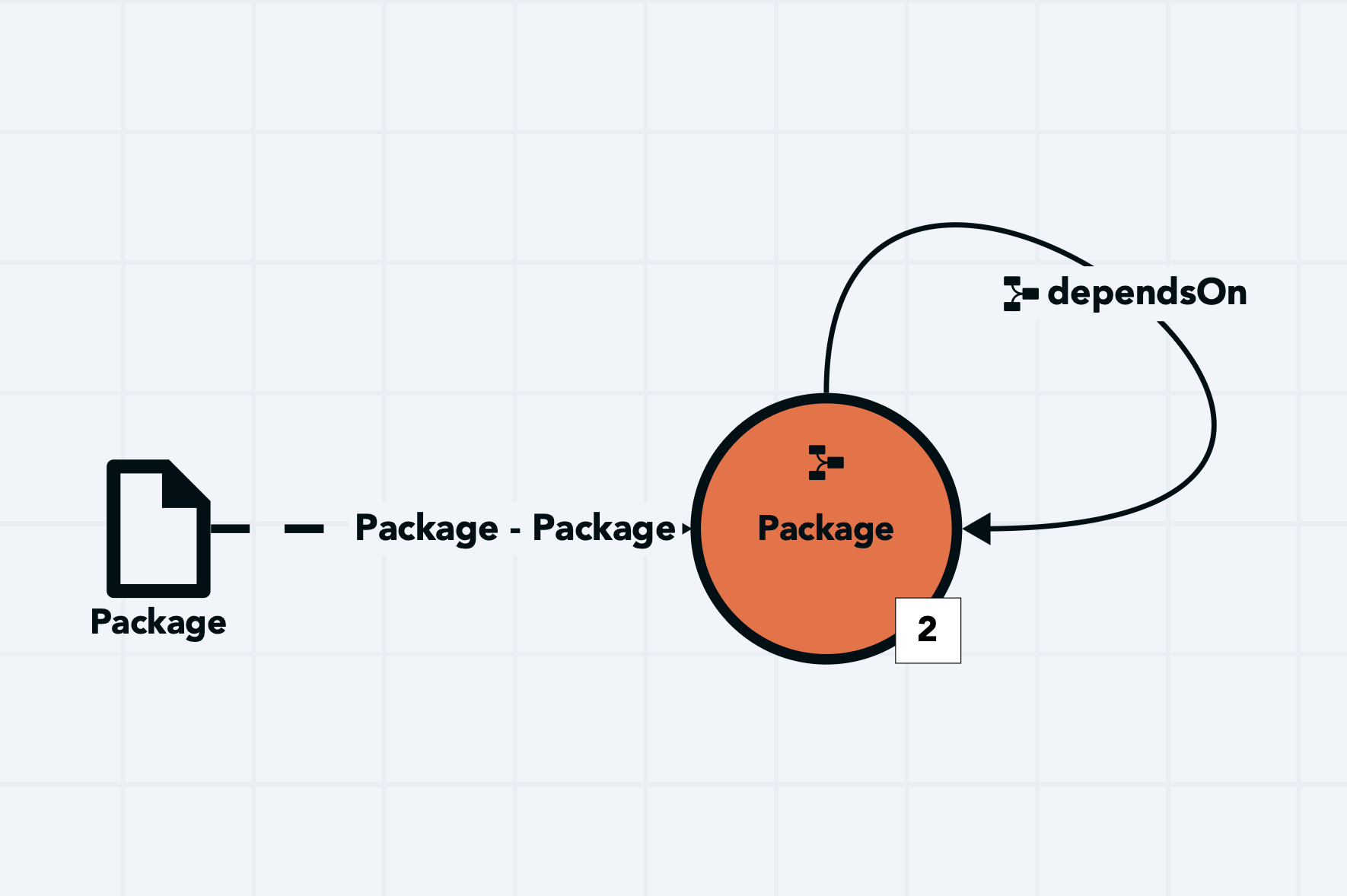
The dependsOn relationship is configured so that both the source & target class is the Package class with the target
identifier pointing to the requires attribute while the source identifier pointing to the package attribute.
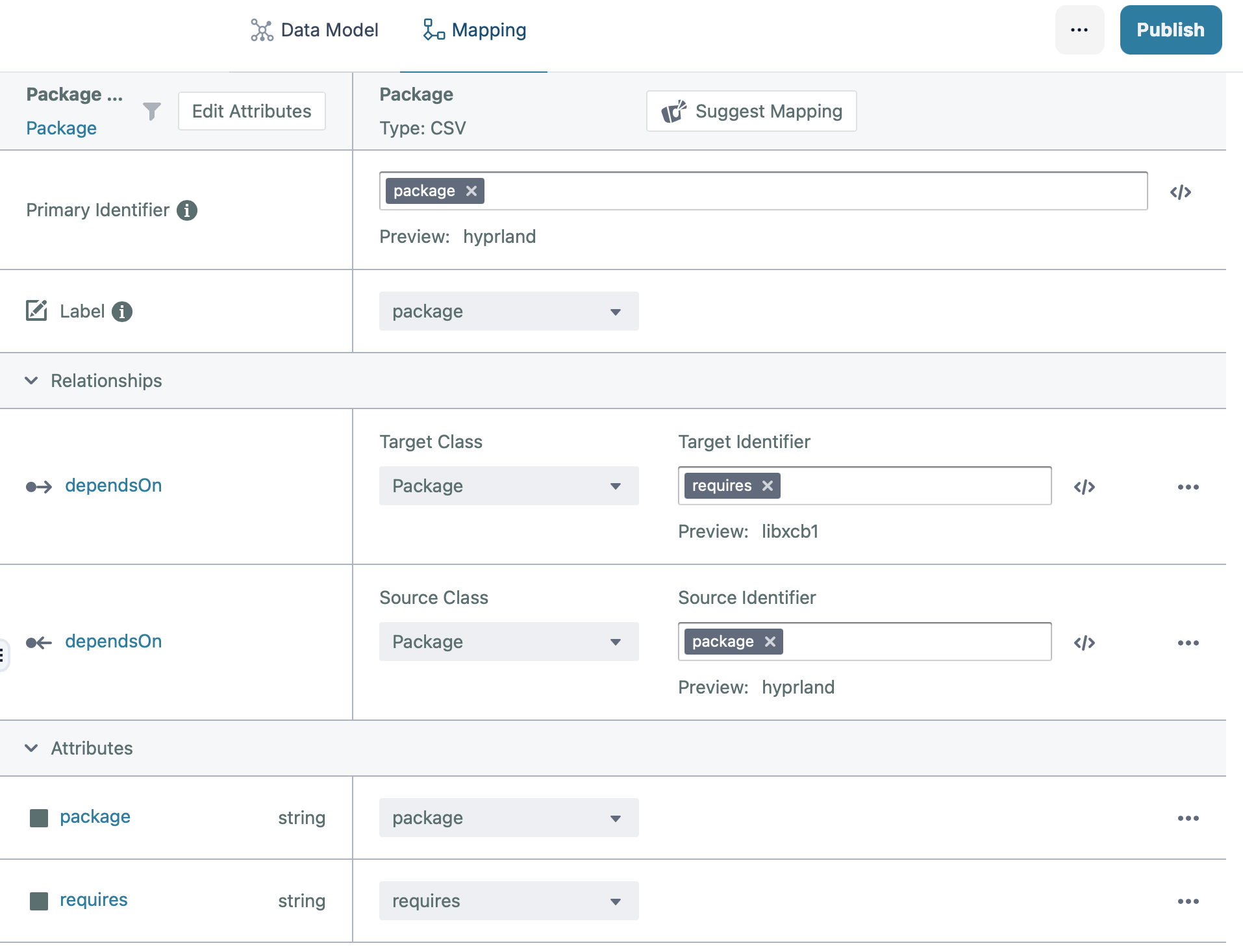
With the model in place, we can now publish to a Stardog database and move on to the Stardog Studio tool to execute
our SPARQL query.
Let's assume we found a bug in libffi8 which we have developed a fix for and now have to figure out which software is
affected and needs to be rebuilt with the patched version of this library, we can use the following query:
PREFIX : <urn:pkg_deps:>
PREFIX Package: <urn:pkg_deps:Package:>

SELECT DISTINCT ?dependentPackage
WHERE {
    ?dependentPackage :dependsOn+ Package:libffi8 .
    FILTER (?dependentPackage != Package:libffi8)
}
Which results in:
pkg_deps:Package:libwayland-client0
pkg_deps:Package:libwayland-server0
pkg_deps:Package:hyprland
pkg_deps:Package:weston
We can see now that we need to rebuild libwayland-client0, libwayland-server0, hyprland & weston. In particular,
both hyprland & weston only transitively depend on libffi8 (through libwayland-client0 & libwayland-server0),
yet the above simple query was able to give us the full dependency graph from the bottom up. Imagine doing this with a
traditional RDBMS when you have 10 or 20 layers of indirection!
The magic is in the the + operator applied to the :dependsOn relationship which tells Stardog to follow the link one
or more times. We also need to filter for FILTER (?dependentPackage != Package:libffi8) because in our simplistic,
naive data model, we are storing both the package and its dependencies in a single class and creating a relationship
mapping from Package to itself. Without this filter, Package:libffi8 will also appear in the result.
To visualize the dependency graph, for example, to see how hyprland depends on libffi8, we can run the following
query:
PREFIX : <urn:pkg_deps:>
PREFIX Package: <urn:pkg_deps:Package:>

PATHS
START ?s = Package:hyprland
END ?e = Package:libffi8
VIA :dependsOn
Which results in:
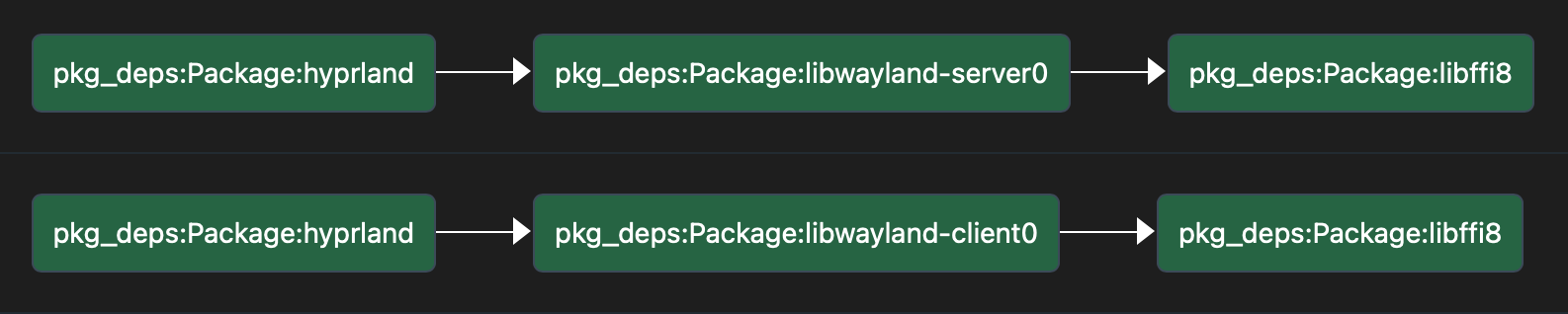
Now we can easily see that there are 2 paths through which hyprland depends on libffi8: through libwayland-client0
and libwayland-server0
Where knowledge graphs outshine the rest - more real world software engineering examples
The bug-tracing scenario is just the most visceral entry point. Knowledge graphs excel at unifying the entire software development lifecycle, turning isolated artifacts into a richly connected web of intent and implementation.
End-to-end Requirements Traceability. Imagine a graph that links a high level business requirement to the user stories that refine it, the implementation tasks pulled into a sprint, the developer who wrote the code, the specific commits that changed the codebase, and the test cases that verify it. With a knowledge graph, a single SPARQL query can answer a question like: "If we deprecate this API endpoint, which requirements are impacted and who are the engineers most familiar with the affected modules?" The query traverses from the endpoint node, through the code modules that call it, to the tasks that spawned those modules, and finally to the original requirement and the assigned developers. No recursive CTE in an RDBMS will cleanly connect a business requirement to a failing test via a chain of five different tables. A vector database might find documents that talk about the requirement, but it won'’'t give you the deterministic, step-by-step path linking the failing test all the way back to the stakeholder's original requirement.
A Structured Brain for AI Coding Agents. The rise of AI assistants like Copilot has been transformative, but they often stumble when asked to reason across an entire codebase. They rely on embedding snippets, which can miss the global architecture. You can ask your AI agents to parse your whole code base, spending a large amount of tokens, probably exceeding your context window so that the agents have an understanding of your code base. The next time you spin up another session, your agents have forgotten everything. This is where tools like Graphify come in. Graphify parses a codebase - functions, classes, modules, parameters, call graphs, and data flow - and emits it as a knowledge graph of triples. Suddenly, an AI agent gains a precise, queryable map of the software. Instead of asking a vector DB "find me code that looks like a payment processor" the agent can ask the knowledge graph: "Show me the complete call chain from the REST controller down to the database query for placing an order, and list every validation function invoked along the way." The answer is exact, deterministic, and contextual. You can even enrich this graph with design patterns, known anti-patterns, and architectural rules. The AI agent uses Stardog to navigate the codebase with perfect recall, grounding its suggestions in logical truth rather than statistical similarity. This is how you prevent an AI from inventing a non-existent utility function - it knows the graph, so it can confirm whether that function actually exists and who its callers are.
Stardog: engineering the semantic enterprise
Stardog exemplifies the modern knowledge graph platform by solving the "last mile" problems of enterprise adoption. It's not just a graph database; it's a data fabric. With its virtualization capabilities, Stardog can map existing relational tables into a virtual graph on the fly, so you don't need to rip and replace your Jira or Git repositories. You query your old relational data as if it were a graph, joining it seamlessly with the RDF output from Graphify, your SBOMs, DataBricks datasource, and test reports. Virtualization is outside the scope of this article, but if you want to know more, Stardog has good documentation on virtual graphs.
Its reasoning engine is W3C-standard compliant, handling OWL and custom rules to ensure that the answers you get back are both sound and complete according to your business logic. And crucially, Stardog's architecture acknowledges that your data is never static. Its change tracking and automated reasoning ensure that when a new dependency is added, the "dependsOn" relationship is updated, keeping your graph's "knowledge" alive and current.
By now, this article may look like an Stardog advertisement. In some way, it probably is since in this article, I concentrated on use cases where knowledge graphs excel. However, having wrote that, as in all cases, choose the right tool for the job. If your question is "What are all the attributes of record X?" use an RDBMS. If your question is "What things are textually similar to this document?" use a vector database. But when your question is "What are the hidden, multi step consequences connecting this bug to my production systems, my requirements, and my team's entire body of work?" — that's a question for a knowledge graph. It's the difference between finding data and truly understanding the software you build.