Using LiteLLM as a LLM router and a VS Code Copilot chat endpoint

Oct 01, 2026
Choosing the right LLM isn't always straightforward - and manually selecting a model for every single task is a hassle no one wants. Pick the wrong one, and you risk poor performance at best and wasted money at worst.
To solve this, tools like GitHub Copilot default to automatically routing your prompt to the best model for the job, even offering a discount for using auto-selection. But what if you rely on models outside the Copilot ecosystem? Or what if you want finer control over how those choices are made?
In this article, I'll show you how to use LiteLLM as an automatic model router directly inside Visual Studio Code.
Project setup
The first step is setting up your LiteLLM project. Assuming you already have uv installed, run:
uv init --package litellm-hybrid
cd litellm-hybrid
uv python pin 3.12
uv add "litellm[proxy]"
uv sync
That's it! Verify the installation by checking the version:
uv run litellm --version
LiteLLM configuration
LiteLLM uses a YAML configuration file - let's call it config.yaml - with the following setup:
model_list:
  # the 0.8B judge, as a first class model so the classifier can reach it
  - model_name: judge
    litellm_params:
      model: ollama/qwen3:0.6b
      api_base: http://127.0.0.1:11434

  # tier member: local
  - model_name: local-tier
    litellm_params:
      model: ollama/qwen3.5:9b
      api_base: http://127.0.0.1:11434
      num_ctx: 32768
    model_info:
      max_input_tokens: 28000 # MUST be declared or size-escalation never fires
      max_output_tokens: 8192
      supports_function_calling: true

  # tier member: Copilot's own model
  # No api_key here. Credentials come from the device flow, cached on disk
  # under GITHUB_COPILOT_TOKEN_DIR
  - model_name: copilot
    litellm_params:
      model: "github_copilot/gpt-5-mini"
    model_info:
      mode: chat
      max_input_tokens: 120000
      max_output_tokens: 32000
      supports_function_calling: true
      supports_vision: true

  # what VS Code actually calls
  - model_name: hybrid
    litellm_params:
      model: auto_router/complexity_router
      drop_params: true # VS Code sends params some upstreams reject
      complexity_router_default_model: copilot
      complexity_router_config:
        tiers:
          SIMPLE: local-tier
          MEDIUM: copilot
          COMPLEX: copilot
          REASONING: copilot

        # the small model, used for judging the complexity of the task
        classifier_type: llm
        classifier_llm_config:
          model: judge
          timeout_ms: 5000
        classifier_fallback: heuristic # judge down/slow -> scorer, never 500

        # size: escalate a tier that provably cannot hold the prompt
        enable_context_window_escalation: true
        context_window_escalation_buffer: 0.95

        # pin a conversation to its first tier
        session_affinity: true
        session_affinity_ttl_seconds: 3600

        # deterministic short circuits, run before the classifier
        keyword_tier_rules:
          - keywords: ["rename", "docstring", "typo", "reformat", "add a comment"]
            tier: SIMPLE
          - keywords: ["architecture", "root cause", "race condition", "migrate", "postmortem"]
            tier: COMPLEX

        # let the response body carry the model that really ran
        return_raw_model_name: true
    model_info:
      max_input_tokens: 120000
      max_output_tokens: 32000

router_settings:
  enable_pre_call_checks: true
  context_window_fallbacks:
    - local-tier: ["copilot"] # safety net if a local prompt slips through
  num_retries: 2
  fallbacks:
    - copilot-auto: ["local-tier"] # Copilot unreachable? degrade instead of erroring

general_settings:
  master_key: sk-local-1234
The comments in the file cover the details, and a full deep dive into every configuration option is outside the scope of this article (see the LiteLLM documentation for a complete reference). To summarize, this configuration:
- Defines three internal models:
judge(backed by localollama/qwen3:0.6b), local-tier (backed by localollama/qwen3:9b), andcopilot(backed by Copilot's cloud hostedgpt-5-mini). - Creates a router model named
hybrid: Uses judge to evaluate prompt complexity and route requests to eitherlocal-tierorcopilot. - Sets default routing behavior: Directs all prompts to
copilotby default, reserving local-tier for simple tasks. - Adds routing shortcuts: Filters out models that can't handle large contexts when needed and short circuits routing based on specific prompt keywords.
- Secures access: Sets a required API key (
sk-local-1234) for incoming requests.
Start LiteLLM on port 4000:
uv run litellm --config config.yaml --port 4000 --detailed_debug
When starting LiteLLM for the first time, keep an eye on the terminal output. Because the copilot tier requires an
active GitHub Copilot subscription, LiteLLM will prompt you to visit a URL and enter a verification code to authorize
the instance.
You can test the router using these three requests:
curl -s http://127.0.0.1:4000/v1/chat/completions \
  -H "Authorization: Bearer sk-local-1234" -H "Content-Type: application/json" \
  -d '{"model":"hybrid","messages":[{"role":"user","content":"What are you?"}]}'

curl -s http://127.0.0.1:4000/v1/chat/completions \
  -H "Authorization: Bearer sk-local-1234" -H "Content-Type: application/json" \
  -d '{"model":"hybrid","messages":[{"role":"user","content":"Rename foo to bar"}]}'

curl -s http://127.0.0.1:4000/v1/chat/completions \
  -H "Authorization: Bearer sk-local-1234" -H "Content-Type: application/json" \
  -d '{"model":"hybrid","messages":[{"role":"user","content":"Why does this worker deadlock under load?"}]}'
Checking LiteLLM's debug logs shows how each request is handled.
Query 1: Evaluated as low complexity by the judge model, so it routes to local-tier:
02:23:34 - LiteLLM Router:DEBUG: router.py:7441 - Async Response: ModelResponse(id='chatcmpl-dfedee4a-1bd0-40a9-bc79-01447c5bfc69', created=1790814214, model='ollama/qwen3:0.6b', object='chat.completion', system_fingerprint=None, choices=[Choices(finish_reason='stop', index=0, message=Message(content='{ "tier": "SIMPLE" }', role='assistant', tool_calls=None, function_call=None, provider_specific_fields=None, reasoning_content=None))], usage=Usage(completion_tokens=181, prompt_tokens=288, total_tokens=469, completion_tokens_details=None, prompt_tokens_details=None))
Query 2: Routes to local-tier via a fast keyword shortcut (rename), skipping judge evaluation:
02:18:54 - LiteLLM Router:INFO: complexity_router.py:4475 - ComplexityRouter: routing decision cause=literal_keyword_match, escalated=False, tier=SIMPLE, routed_model=local-tier
Query 3: Evaluated as medium complexity, so it escalates to copilot:
02:17:12 - LiteLLM Router:DEBUG: router.py:7441 - Async Response: ModelResponse(id='chatcmpl-a0cf2e32-9213-44b0-9fcc-fbdfe92ba0cf', created=1790813832, model='ollama/qwen3:0.6b', object='chat.completion', system_fingerprint=None, choices=[Choices(finish_reason='stop', index=0, message=Message(content='{\n\n"tier": "MEDIUM"\n\n \t\t\t\t\t\t\t\t\t\t\t\t\t\t\t\t\t}', role='assistant', tool_calls=None, function_call=None, provider_specific_fields=None, reasoning_content=None))], usage=Usage(completion_tokens=203, prompt_tokens=292, total_tokens=495, completion_tokens_details=None, prompt_tokens_details=None))
VS Code integration
The final step is connecting our LiteLLM router (hybrid) to VS Code for use in Copilot Chat:
- Open the Command Palette (
Ctrl + Shift + Pon Windows/Linux orCmd + Shift + Pon macOS). - Run Chat: Manage Language Models.
- Select
Add Models->Custom Endpointand complete the prompts.
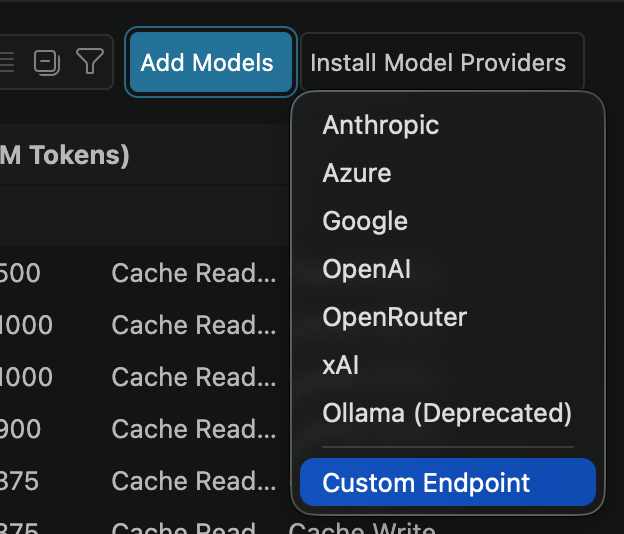
Once finished, VS Code will open chatLanguageModels.json with a new configuration similar to this:
{
  "name": "LiteLLM",
  "vendor": "customendpoint",
  "apiKey": "${input:chat.lm.secret.330358b0}",
  "models": [
    {
      "id": "hybrid",
      "name": "Auto (LiteLLM Router)",
      "url": "http://127.0.0.1:4000/v1/chat/completions",
      "toolCalling": true,
      "vision": true,
      "maxInputTokens": 128000,
      "maxOutputTokens": 16000
    }
  ]
}
Leave apiKey as is (VS Code automatically resolves the secret variable). Just ensure that id matches your router
name (hybrid) and url points to your running LiteLLM instance.
That's it! You can now select Auto (LiteLLM Router) directly from the Copilot Chat model selector and let LiteLLM
manage prompt routing automatically.
A few important caveats to keep in mind:
- Session affinity: Because of the session_affinity setting in config.yaml, LiteLLM maintains model selection across an active thread. To trigger the routing evaluation for a new query, start a new chat session.
- Tool calling limitations: If a prompt routes to
local-tier, the model (ollama/qwen3:9b) will output raw JSON representing tool calls rather than executing them directly (such as reading/modifying files or running terminal commands). Enabling proper tool harness execution for local models requires additional setup, which is a topic for a future article.
What if I need more complex logic?
LiteLLM has the handled too! Since in the project setup phase, we have already used uv to initialize our project as a
package, you can just add whatever logic you want to src/ and configure configure them as callbacks in your
config.yml. LiteLLM has good information on how to write callbacks in
their document so I won't go into the details
here. An example of a naive callback that select copilot if the prompt estimated tokens count is larger than 1024 can
be written as follow in src/litellm_router/router.py:
LiteLLM handles custom logic easily. Because we initialized the project as a package with uv, you can add your custom
Python modules under src/ and reference them directly as callbacks in config.yaml.
For a deep dive into implementation, see the LiteLLM Custom Callbacks documentation.
Here is a basic example placed in src/litellm_router/router.py that automatically escalates requests to copilot
whenever the estimated prompt length exceeds 1024 tokens:
import hashlib
import logging

from typing import Any
from litellm.integrations.custom_logger import CustomLogger


log = logging.getLogger("hybrid-routing")


def last_user_text(messages: list[dict[str, Any]]) -> str:
    """Text of a user turn, with multimodal content flattened to its text parts."""
    for msg in reversed(messages or []):
        if msg.get("role") != "user":
            continue
        content = msg.get("content")
        if isinstance(content, str):
            return content
        if isinstance(content, list):
            return " ".join(
                p.get("text", "") for p in content
                if isinstance(p, dict) and p.get("type") in ("text", "input_text")
            )
    return ""


def conversation_key(messages) -> str:
    opening = next((m for m in messages if m.get("role") == "user"), None)
    basis = f"{last_user_text([opening]) if opening else ''}::{len(messages)}"
    return "vscode-" + hashlib.sha256(basis.encode("utf-8")).hexdigest()[:16]


def estimate_tokens(messages, tools) -> int:
    chars = sum(len(str(m.get("content") or "")) for m in messages or [])
    if tools:
        chars += len(str(tools))
    return chars // 4


class HybridHardConstraintHook(CustomLogger):
    async def async_pre_call_hook(
        self,
        user_api_key_dict: Any,
        cache: Any,
        data: dict[str, Any],
        call_type: str,
    ) -> dict[str, Any]:
        if not isinstance(data, dict) or data.get("model") != "hybrid":
            return data
        if not isinstance(data.get("messages"), list):
            return data

        if not isinstance(data.get("metadata"), dict):
            data["metadata"] = {}
        messages = data["messages"]

        # Give LiteLLM a session id so its own `session_affinity` can pin this
        # conversation to one tier. Verify with `cause=session_affinity_pin`
        # in the decision log - if you never see it, the proxy is reading
        # `litellm_metadata` instead, so set the key there too.
        data["metadata"].setdefault("session_id", conversation_key(messages))

        tokens = estimate_tokens(messages, data.get("tools"))
        if tokens > 1024:
            tier = "copilot"
            why = "long messages"
            data["model"] = tier
            data["metadata"].update({"hybrid_tier": tier, "hybrid_reason": why})
            log.info("[hybrid] hard-route -> %s (%s)", tier, why)

        return data


hybrid_router = HybridHardConstraintHook()
Next, add the following snippet to your config.yaml file:
litellm_settings:
  drop_params: true
  request_timeout: 600
  callbacks:
    - litellm_router.router.hybrid_router